




















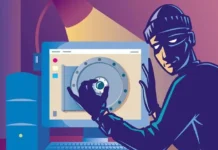





We have all been there, sitting in a hotel lobby, airport lounge, or cafe, happily scrolling through emails or uploading pictures while using the free Wi-Fi. It is easy, quick, and doesn’t seem dangerous. However, here is the truth that makes you uncomfortable: hackers often find it easiest to access public Wi-Fi.
If you have ever connected to a network that didn’t require a password, you basically left your digital door open for anyone with the right tools to look inside. This is when learning how to protect your data with VPNs, encryption, and a few simple steps becomes less of a choice and more of a need.
Why Using Public Wi-Fi Is More Dangerous Than You Think
The point of public Wi-Fi is to make things easier, not safer. Anyone can join, which means that anyone can also view the information that is being shared.
Here are some things that could go wrong-
- Attacks on the man in the middle – A hacker puts themselves between you and the website you are visiting and secretly records everything you send, including passwords, messages, and even bank account information.
- Fake hotspots- You think you are connecting to “Airport Free Wi-Fi,” but it is really a fake network that was made to fool people.
- Unencrypted connections- A lot of public networks don’t encrypt your data, which means that anyone can easily see what you are doing online.
What makes it worse is that it is all so subtle. When someone is spying on you, you won’t get any warnings or alerts. Everything seems fine until it isn’t.
The Real Price of Free Wi-Fi
You might not have to pay for free Wi-Fi, but it could cost you your data and your peace of mind. It can be tiring to deal with the aftermath of having your personal information stolen; recovering accounts, changing passwords, and worrying about identity theft.
Even normal things you do every day, like checking Instagram or responding to an email, can slowly give away small bits of personal information. Hackers can get a pretty good idea of who you are and what you do online if you have more than one login.
So, the next time you want to use the Wi-Fi at a coffee shop, remember that it’s free because you are the product.
How Encryption Protects You
Encryption is like a digital lock that scrambles your data so that even if someone gets it, they can’t read it.
The “s” in the URL of a website that starts with https:// stands for “secure.” It means that the site encrypts your data as it goes from your browser to the server. But that only keeps some of your activity safe. When you are on public Wi-Fi, your whole network connection is still open to attack.
That is why VPNs (Virtual Private Networks) are so useful. They make a safe tunnel between your device and the internet, adding an extra layer of protection to your data that hackers can’t get through easily.
What a VPN Really Does
Most people know that VPNs are “for security,” but let’s look at that more closely. A VPN
- Encrypts all of your traffic, not just the traffic from certain websites.
- Hides your physical location by masking your IP address.
- It sends your data through secure servers, which stops anyone, even your Internet Service Provider, from seeing what you’re doing.
So, even if you are on a public network that could be dangerous, your digital footprint stays hidden.
Imagine looking at your bank balance while using Wi-Fi at the airport. If you don’t have a VPN, your login information is easy to see. A VPN locks that same data away so that no one nearby can read it.
Choose a Reliable VPN
There are a lot of VPN services, but not all of them are the same. Some keep track of what you do (which defeats the whole point), and others make your connection so slow that it stops working.
Make sure to check
- No-logs policy- The VPN shouldn’t keep track of what you do online.
- Strong encryption standards- For example, AES-256, which is the same level used by banks and governments.
- Global servers- They are fast and help keep things moving while you are on the go.
- Compatibility- Should work on all kinds of devices, from laptops to phones.
Tools like ExpressVPN are a good mix of speed, privacy, and ease of use, especially for people who travel a lot and change networks often. You can turn on this app in seconds, and it will protect your connection right away, no matter where you are. For the subscription, you can check out CouponzGuru for the best savings deals and promo codes, helping you protect your information at an affordable price.
How to Use a VPN Safely on Public Wi-Fi
It is great to have a VPN, but it’s just as important to know how to use it correctly.
Here is how to make sure you are getting the best protection-
- Before you connect to public Wi-Fi, turn it on. If you connect first, there is already a small window where data can leak.
- Keep it running while you work, stream, or browse.
- Only disconnect after you have logged out of your accounts.
It is like locking your car doors before you drive off.
Other Easy Things You Can Do
VPNs and encryption are strong tools, but they are not the only ones you have. Here are a few simple habits that can have a big effect-
- When you are done with whatever work you were doing, forget the network. This stops your phone from automatically reconnecting the next time.
- Only log into your bank or work accounts on public Wi-Fi if you really have to.
- Two-factor authentication (2FA) adds an extra layer of security. Even if someone knows your password, they still can’t get in.
- Make sure your device is up to date. Hackers often take advantage of security holes that software updates fix.
If you are on the road and need to get to sensitive data, use a personal hotspot.
Spotting Unsafe Wi-Fi Networks
Some public Wi-Fi networks are riskier than others, but some signs should make you cautious right away.
Be careful of-
- Networks with names like “Free Public Wi-Fi” or “Guest Wi-Fi 1.”
- Links that don’t need a password and pages that you don’t know about.
- Trust your gut if something seems wrong. Instead of connecting, use mobile data or a secure hotspot.
The Future of Wi-Fi Security
People are slowly starting to understand that privacy is important. WPA3 and other new Wi-Fi protocols provide better security. Also, more apps now use end-to-end encryption by default.
However, even though technology gets better, people still do the worst things. Hackers know that we like things that are easy to use. That is why knowing how to keep your own data safe is still the best way to protect yourself.
Soon, devices or routers might come with built-in VPN-like features that encrypt all network activity by default. It is up to us to take charge until then.
Wrapping it Up
You don’t have to be overly cautious while using public Wi-Fi; it is about being aware. By following the above-mentioned steps, you can save yourself from major headaches later. Protecting your data on public Wi-Fi is more like locking your digital information before stepping into the online world.
Make sure to protect your privacy while doing everything, including checking your emails, scrolling through social media, and more.